PreviewFree
- One 5-rep ghost
- One clean race
- Local race history
Enough to feel the full loop.
 Ghost Race
Launching soon
Ghost Race
Launching soon
Push-upsiPhone + WatchLive race
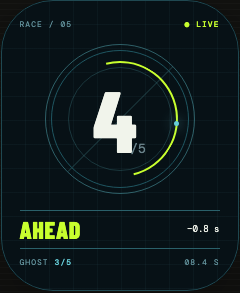
Ghost Race turns the pace of a real push-up set into a rival. Count with your iPhone camera or Apple Watch. Every rep is a checkpoint. The finish line is the last one.
00 / The idea
There is no generic opponent and no abstract score. The ghost is a set you actually completed: the same rep count, the exact pace between reps, waiting for a rematch.
01 / Race protocol
Record / baseline
Choose iPhone Camera or Apple Watch and do a clean set. Each accepted rep becomes a timestamp in your ghost's pace.
Race / live
Ahead, tied or behind updates live as your count meets the ghost's timeline.
Finish / automatic
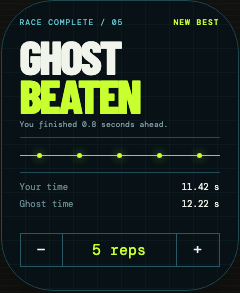
The race stops on the target rep. See the gap, correct the count if needed, then run it back.
02 / On the wrist
The Watch handles the countdown, live count, position and finish. A short haptic confirms each accepted rep so you do not need to break form to stare at the screen.
No video saved.
No cloud upload.
No account.
03 / On iPhone
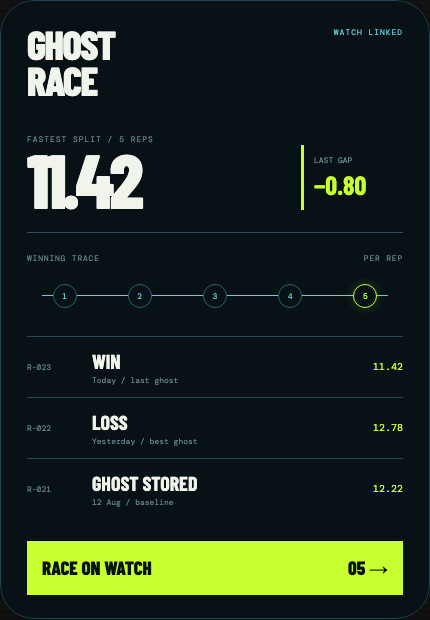
No Apple Watch? Prop up the portrait iPhone at floor level, face it head-first, keep your upper body in frame and wait for READY. Camera frames stay on-device and are never recorded. After the set, the same screen becomes your race log: fastest split, winning trace and recent attempts.
04 / Access
Build a ghost and race it once before deciding. Pricing is shown by the App Store at purchase.
Enough to feel the full loop.
Subscriptions renew through Apple until cancelled.
05 / Private by default
Watch motion and iPhone camera frames are processed on-device during an active set. Production builds keep accepted rep times and the result—not raw motion, video or body landmarks. There are no accounts, ads, analytics or third-party tracking SDKs.
Read the privacy policy06 / Questions
No. Watch mode detects a repeated wrist-motion pattern. Camera mode locates body joints only to frame and count likely movement cycles. Neither mode grades depth, certifies technique or determines whether a repetition is safe.
No. You can create and race a ghost with the iPhone camera. If you use Apple Watch mode, the race runs on your wrist without keeping the iPhone nearby.
For a ghost race, tap “Wrong count? Redo.” The attempt stays in History as unscored and a clean retry starts immediately. Open and Timer can adjust the saved practice total by one because no ghost, record or finish time changes.
Nowhere outside your devices. Camera frames are not recorded or uploaded. Ghost Race has no account or developer server and does not use analytics or advertising SDKs.
Ghost readyDistance 05